> ## Documentation Index
> Fetch the complete documentation index at: https://docs.iremember.app/llms.txt
> Use this file to discover all available pages before exploring further.
# Invite your collaborators
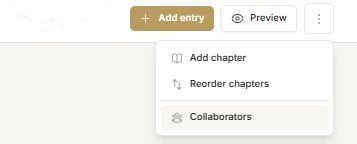
To invite other people to work with you on your book select 'Collaborators' from the dropdown menu under the 3 elipses (vertical dots) in the top right side of the ribbon.
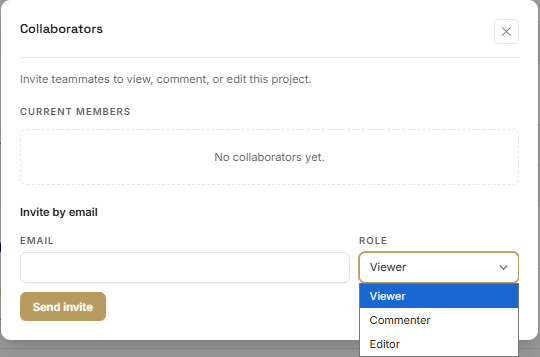
 Add the email address of your collaborator and select their role from the dropdown list. They can be a viewer, commentator or editor.
* Viewers can see the story come together but cannot comment or make edits.
* Commentators can view and make comments on individual entries.
* Editors have full access to view, comment and edit your book.
Add the email address of your collaborator and select their role from the dropdown list. They can be a viewer, commentator or editor.
* Viewers can see the story come together but cannot comment or make edits.
* Commentators can view and make comments on individual entries.
* Editors have full access to view, comment and edit your book.
 Collaborators will receive an email with a link to create an iRemember account. Their dashboard will contain the story you are working on together.